Effective Power Nap Strategies for Better Energy and Sleep Health
Effective Power Nap Strategies: A Practical Guide to Better Daytime Rest Effective power nap strategies can boost your focus, mood, and recovery without...
In this article
Effective power nap strategies can boost your focus, mood, and recovery without wrecking your night’s sleep. Used well, naps can support your sleep schedule, help you fall asleep fast at night, and even improve deep sleep quality. Used badly, they can leave you groggy, awake at 2 a.m., and wondering why you feel tired even after 8 hours in bed.
This guide explains how to nap in a way that fits healthy sleep hygiene, supports your long‑term rest, and works with your body’s clock rather than against it.
Are Naps Good or Bad for Your Sleep?
Naps are not “good” or “bad” by default. The impact depends on nap timing, length, and your overall sleep health. Short, planned naps can help you recover from mild sleep deprivation, improve reaction time, and support recovery after workouts. Long, late naps can interfere with falling asleep fast at night and may worsen sleep problems.
When Naps Help Your Health
If you are short on sleep, a brief nap can ease pressure and improve alertness. Naps can help shift workers, new parents, and people recovering from intense training or illness. In these cases, naps act like a safety valve that reduces daytime sleepiness.
Think of naps as a supplement, not a replacement. They work best when your base sleep habits are solid and your nightly sleep duration is close to what your body needs.
When Naps Can Make Sleep Problems Worse
If you already struggle to sleep, wake up often at night, or suspect sleep apnea, naps can sometimes mask the problem instead of fixing it. Long or late naps may reduce your sleep drive at night and keep you in a cycle of poor sleep and daytime fatigue.
In those cases, focus on night sleep first and use naps carefully as a short‑term tool, not a daily crutch. If you rely on naps to get through every day, consider checking your night sleep quality and overall schedule.
How Many Hours of Sleep Do You Need If You Nap?
Most adults function best with about 7–9 hours of sleep in 24 hours. Power naps fit inside that total; they do not sit on top of it. A 20‑minute nap does not mean you can cut two hours from your night and feel great.
Balancing Night Sleep and Daytime Naps
If you sleep less than you need at night, short naps can ease the pressure and help you get through the day. But chronic sleep loss still adds up. Over time, you may feel tired after “8 hours of sleep” because the quality is poor, the schedule is irregular, or your body is catching up from a long sleep debt.
Use naps to smooth rough days, then work on a consistent sleep schedule so your main recovery still comes from night sleep.
Signs You Are Not Getting Enough Sleep
Common signs include needing an alarm to wake most days, heavy afternoon slumps, and strong cravings for caffeine or sugar. You may also feel irritable, unfocused, or slow during simple tasks. If these issues persist even with naps, you likely need more or better night sleep.
When you match your total hours to your needs and keep a regular schedule, naps become a helpful bonus instead of a crutch.
Core Sleep Hygiene Rules That Make Naps More Effective
Good sleep hygiene gives your brain clear signals about when to be awake and when to rest. Strong daytime and nighttime habits make power naps more effective and reduce the risk that a short rest turns into a long, confusing sleep.
Daily Sleep Hygiene Checklist
Here is a simple sleep hygiene checklist that supports both naps and night sleep:
- Wake up at the same time every day, even after a bad night.
- Get bright light in your eyes within an hour of waking.
- Avoid heavy caffeine after late morning; skip energy drinks late in the day.
- Keep naps early to mid‑afternoon, not in the evening.
- Reserve your bed for sleep and sex, not scrolling or work.
- Keep your bedroom cool, dark, and quiet at night.
- Use a wind‑down routine before bed instead of screens.
These habits help your body clock stay steady. A steady clock means your naps are more refreshing and your night sleep is deeper and easier to start.
Room Temperature, Light, and Noise Basics
The best room temperature for sleep is usually on the cooler side, and the same applies to naps. A slightly cool, quiet, and dim space helps your body drop into light sleep quickly. Heavy heat or bright light can keep you in a half‑awake state that feels more like restlessness than rest.
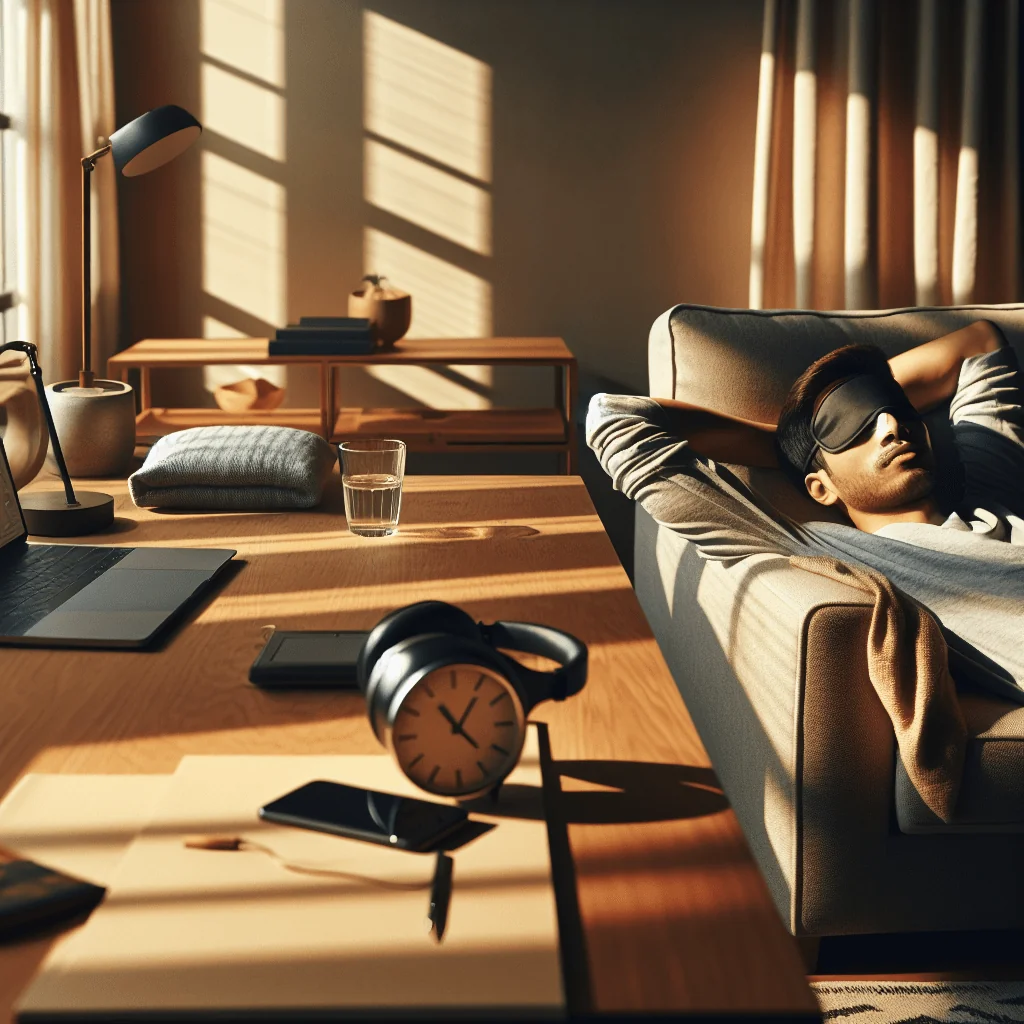
If you nap at work or in a bright home, use simple tools. An eye mask, light blanket, or even leaning back with your jacket over your eyes can improve comfort and support better rest.
Step‑by‑Step: Effective Power Nap Strategies That Actually Work
Power naps work best when they are short, planned, and aligned with your natural energy dip. The steps below will help you nap without harming your night sleep.
Step‑by‑Step Power Nap Routine
Follow this sequence to build a reliable nap habit that supports, rather than harms, your sleep schedule:
- Pick the right time window. Aim for a nap between about 1 p.m. and 3 p.m. This lines up with a natural drop in alertness. Very early naps may feel pointless, and late afternoon naps can delay sleep at night.
- Decide your goal and length. For a quick boost, set a timer for 10–20 minutes. This helps you avoid deep sleep, which can cause grogginess. If you are very sleep‑deprived and can afford it, a 60–90 minute nap may help you catch up, but use this rarely and not late in the day.
- Create a mini sleep zone. Lie down or recline, dim the lights, and silence notifications. A cool, quiet space helps you fall asleep fast. Even an eye mask or earplugs can make a short nap more effective.
- Use a simple wind‑down cue. Take a few slow breaths, relax your jaw and shoulders, and let your thoughts drift. A short breathing pattern, like a slow 4‑second inhale and 6‑second exhale, can help your body switch into rest mode quickly.
- Set a firm alarm. Do not rely on “waking up when you feel ready.” An alarm keeps your nap within the target range and protects your sleep schedule. Get up when the alarm rings, even if you feel like you could sleep longer.
- Stand, stretch, and get light after waking. Move your body, drink some water, and step into brighter light. This helps clear any grogginess and signals to your brain that nap time is over.
With practice, your brain learns this short routine and starts to fall asleep faster during naps, much like a bedtime routine trains you to wind down at night.
How to Stop Scrolling Before a Nap
Phones and laptops affect both naps and night sleep. Blue light from screens tells your brain to stay alert and can delay melatonin release. If you scroll right before a nap, your brain may stay in “day mode” and fight sleep.
To nap effectively, stop scrolling at least a few minutes before you lie down. Close your eyes, breathe slowly, and give your mind something simple and calm to focus on, like counting breaths. This same habit later supports your ability to stop scrolling before bed at night.
Why You Wake Up Tired After Naps (and How to Fix It)
Waking from a nap and feeling worse is usually a sign of sleep inertia. Sleep inertia is that heavy, foggy feeling you get when you wake from deep sleep. Long naps, especially 30–60 minutes, often drop you into deep sleep, then yank you back out.
Common Causes of Post‑Nap Grogginess
The main causes are napping too long, napping too late, or waking from deep sleep. Heavy meals and late caffeine can also make you feel sluggish after a nap. If you often wake up tired after naps, your nap habits likely need a few small changes.
To reduce this, keep power naps under 20 minutes, or go all the way to a full sleep cycle of about 90 minutes if you truly need deep recovery and have time. Also, get moving and seek light as soon as you wake up.
Why Am I Tired After 8 Hours of Sleep?
If you feel tired after 8 hours of sleep and even short naps do not help, consider your sleep quality. Frequent waking at night, snoring, or breathing pauses may hint at sleep apnea or another sleep disorder that naps cannot fix. Stress, irregular bedtimes, and alcohol close to bedtime can also reduce deep sleep and leave you unrefreshed.
In those cases, naps may hide the problem for a while, but you still need to improve your night sleep or seek medical advice for possible sleep apnea symptoms or other conditions.
How Power Naps Affect Deep Sleep and Your Night Schedule
Deep sleep is the heavy, slow‑wave sleep that restores your body and brain. Short power naps usually do not include much deep sleep, which is why they can refresh you without much disruption at night. Long or late naps, however, can steal deep sleep from your night and make it harder to fall asleep fast.
Protecting Deep Sleep at Night
If you are trying to improve deep sleep at night, protect your bedtime and wake time first. Keep naps early in the day, short, and consistent. Over time, a steady schedule helps your body place most deep sleep in the first part of the night, where it belongs.
If you notice you cannot fall asleep at night on days you nap, shorten the nap or move it earlier. Your body may be sensitive to even small changes in sleep pressure.
How to Fix a Disrupted Sleep Schedule
To fix a sleep schedule, choose a wake time and stick to it every day for at least one to two weeks. Go to bed when you feel sleepy, not just when the clock says, and avoid long naps during the reset period. If you must nap, keep it very short and early.
Morning light, regular meals, and consistent activity during the day all help your body lock in a new schedule and support better deep sleep at night.
Power Naps, Screens, and Blue Light
Phones, tablets, and laptops can delay sleep by sending strong blue light into your eyes. Blue light and sleep have a clear link: bright blue light in the evening tells your brain that it is still daytime. This delays melatonin and makes both naps and night sleep harder to start.
Blue Light and Sleep Impact
Before naps, bright screens can keep your brain alert and make short naps less effective. Before bedtime, they can push your sleep later and reduce deep sleep. To protect your sleep, dim screens in the evening, use night modes if available, and set a “screen off” time before bed.
For naps, aim for at least a brief “no screen” window. Even five to ten minutes of calm, screen‑free time before lying down can help you fall asleep faster.
Room Temperature, Environment, and Nap Quality
The space you nap in can make or break your rest. A cool, quiet, and dark or dim area helps your body relax and drift off quickly. Even if you nap on a couch or in a chair, small changes in comfort can raise the quality of your nap.
Best Room Temperature for Sleep and Naps
Most people sleep best in a slightly cool room, and naps follow the same rule. Heavy heat or stuffy air can cause light, broken sleep. If you can, adjust a fan, open a window, or move to a cooler spot for your nap.
A calm environment also reduces stress, which supports better sleep overall. Less stress means your brain can let go more easily, both during naps and at night.
Power Naps, Recovery, and Rest Days From Exercise
Recovery habits after workouts go beyond protein and stretching. Sleep is the main driver of muscle repair and performance. If your training is heavy, a short nap can help ease mental fatigue and support learning of new skills, like complex lifts or new movements.
How Many Rest Days Do You Need?
Many people do well with at least one or two rest days per week, depending on training load and intensity. Rest days give your body and nervous system time to reset. On those days, a short nap can feel especially good, but keep it brief so you still sleep deeply at night.
Watch your patterns. If you need long naps most days just to function, you may be under‑recovering or over‑training. In that case, adjust your training plan and protect your night sleep first.
Magnesium, Melatonin, and Other Aids: Do They Matter for Naps?
Many people ask whether magnesium for sleep or melatonin dosage for sleep can improve naps. These tools have specific roles, but they are not the main drivers of power nap success.
Magnesium and Melatonin for Sleep
Magnesium for sleep may help some people feel calmer, especially if their diet is low in magnesium. However, magnesium is not a quick nap switch. Any effect is usually gentle and gradual, and it works best as part of overall healthy habits.
Melatonin dosage for sleep is aimed at shifting your body clock or easing you into night sleep. Using melatonin for daytime naps is usually not helpful and can confuse your internal clock if you take it at random times.
When to Focus on Habits Instead of Aids
If you think you need pills to nap, step back and look at your schedule, light exposure, caffeine intake, and stress, rather than reaching for supplements first. Strong habits usually improve both naps and night sleep more than occasional pills.
Use supplements only as one small part of a bigger plan that includes good sleep hygiene, a regular schedule, and stress management.
Tracking Naps and Night Sleep Accurately
To use power naps well, you need some sense of how they affect your 24‑hour sleep. Many people now use wearables or apps to track sleep. These tools can give useful trends, like how long you stay in bed, rough sleep timing, and nap duration.
How to Track Sleep Without Obsessing
Devices can misread deep sleep and light sleep, and they may guess wrong about awakenings. Use them as guides, not as strict judges. Pay close attention to how you feel during the day, your ability to focus, and your mood.
If you are trying to fix a sleep schedule, write down your bedtime, wake time, and nap times for a week. You will quickly see patterns, like late naps leading to later bedtimes. Then adjust one thing at a time.
Simple comparison of nap types and their likely effects
| Nap Type | Length | Best For | Possible Downsides |
|---|---|---|---|
| Power nap | 10–20 minutes | Quick alertness boost, busy days | May feel too short if very sleep‑deprived |
| Recovery nap | 60–90 minutes | Severe sleep loss, rare use | Can cause grogginess, may delay night sleep |
| Late afternoon nap | Any length | Shift work or unusual schedules | Often delays bedtime, reduces deep sleep at night |
This simple table highlights how nap length and timing change the benefits and risks. Choosing the right type of nap for your situation helps you gain energy without harming your night sleep.
Using Power Naps Without Losing Control of Your Sleep Schedule
Effective power nap strategies are simple: keep naps short, early, and planned, and support them with strong sleep hygiene. Use naps to smooth out tired days or support recovery, not as a daily replacement for proper night sleep.
When to Seek Help for Ongoing Sleep Problems
If you keep waking up at night, snore loudly, gasp, or feel exhausted despite what looks like enough sleep, consider talking with a health professional about possible sleep apnea symptoms or other sleep disorders. Naps can help you cope for a while, but long‑term health depends on solid, deep, and regular night sleep.
By combining smart nap habits, a regular schedule, and stress reduction, you can use power naps as a helpful tool that supports your energy, recovery, and overall sleep health.